Sub-frame Rendering
Sub-frame rendering re-renders a subset of frames into a new set of 256 frames.
It can be used to trim starting and ending frames or to extract an interesting "sweet spot" and create a full wavetable from it. This process is often much easier than reconfiguring dozens of parameters and their modulation curves.
The design philosophy behind this tool is: "Refine your happy accidents without messing them up."
Tip
Try finding or creating a "busy" wavetable project with fast changes. Find an interesting frame or a few frames, and experiment with tight frame limits spanning between neighboring frames. Many effects and combiners will work well, and you might end up with new evolving sounds. While some configurations may still produce jumpy transitions, in many cases, you'll end up with new in-between frames that you can use further.
Note
Sub-frame rendering can be a bit confusing if you open a project without noticing it. It might also reverse the flow of frame indices. The main frame slider and all modulation curves display special widgets (see the following chapters) that show the current sub-frame limits. You can easily disable sub-frame rendering to access all sounds of the "original" wavetable.
The UI widget
Sub-frame rendering can be configured using the "target" icon located on the right side of the main frame slider.

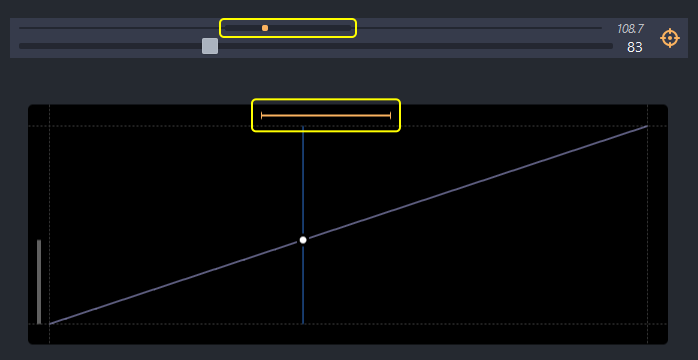
When enabled, sub-frame rendering displays an additional widget on top of the main slider. This widget shows the limits and the position of the current frame within the original project's set of 256 frames. The original frame index may be fractional, while the main slider displays and adjusts the new frame index within the 1-256 range.

The editor UI
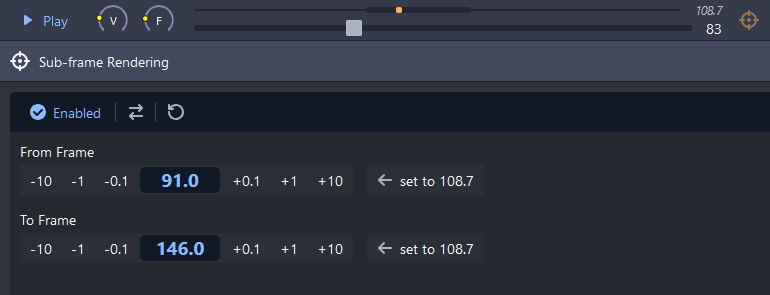
The sub-frame rendering UI allows you to define a sub-range of frames to be "expanded" into the new 1-256 range. You can fine-tune the "from" and "to" limits using fractional frame indices. These limits can also be flipped, resulting in the "from" value being greater than the "to" value.
The additional curve widget
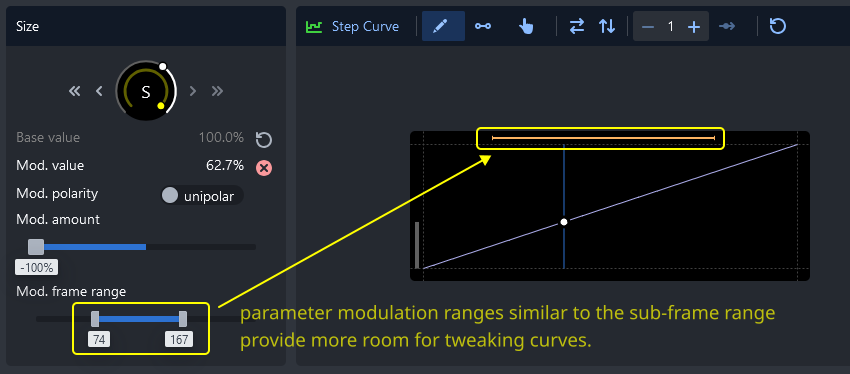
When sub-frame rendering is enabled, all curves display an additional top widget. This widget visualizes the relationship between the curve, the modulation range, and the new sub-frame range.
Tip
If you want to modify the modulation of a parameter while using sub-frame rendering, try adjusting the modulation range limits. This approach can be much easier than tweaking the curve over very small ranges.