
Lanes & Module Previews
Lanes
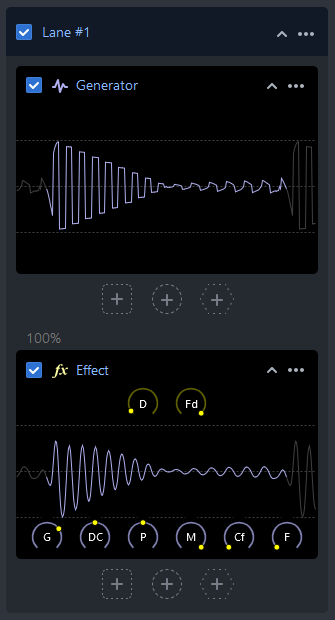
A lane contains an ordered list of modules. The top module placeholder is always reserved for a generator, while other placeholders may contain different types of modules.
Although lanes typically have a top generator, it is not a strict requirement for producing sound. A lane without a generator can use a mix combiner to obtain a signal from another lane. Conversely, a lane with a generator may not produce sound if it ends with a stopper or if the contained modules produce only silence.
Lanes can be added, enabled/disabled, deleted, renamed, and sorted.
Modules
Modules are displayed as simple cards that show the current module output and provide parameter knobs (when the mouse pointer is hovering). Module previews are generally sufficient for quickly adjusting parameter base values, while editors offer additional tools and typically render extra widgets over the frame data. On top of that, editors typically provide additional parameters for complex modules.
Modules can be added, enabled/disabled, deleted, renamed, sorted, copied, and edited.
Placeholders
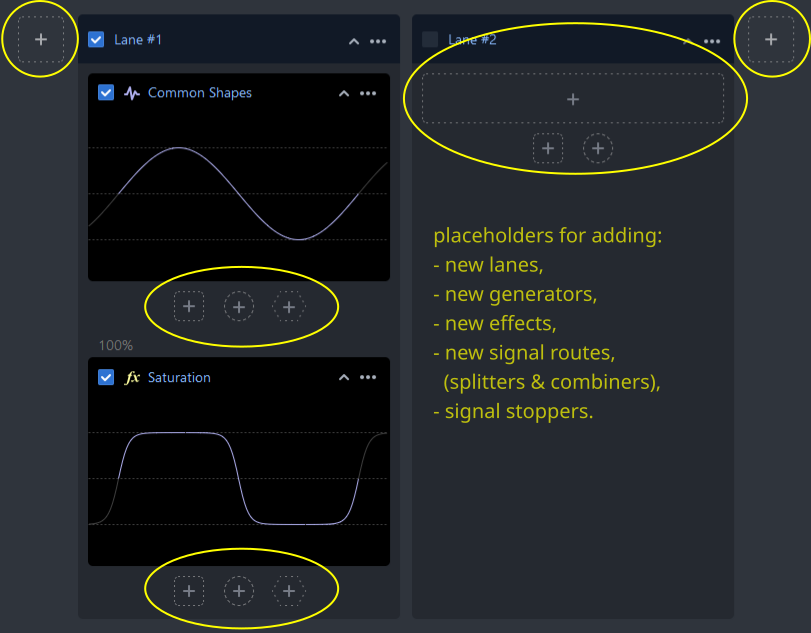
The UI provides placeholders for all elements that can be added. These placeholders offer descriptive tooltips and additional menus where applicable. If desired, some placeholders can be hidden, and module cards can be collapsed to improve the project overview.